When to ask for App Store reviews: what a solo founder at $2.4K MRR learned, and what our review data shows
A solo founder took an iPhone app to about $2.4K MRR and 101 App Store ratings. He changed when and how he asks for reviews. What it moved was conversion, not ranking. We checked his approach against 12,330 Health & Fitness reviews.
The short answer
Ask for an App Store review after the user has gotten value, at the end of something they finished successfully. Never during onboarding and never at launch. Apple’s own StoreKit documentation says the same, and caps the native prompt at three times in 365 days.
GainFrame, an iPhone app that turns gym progress photos into body-fat estimates, followed that rule, added a short personal message before the prompt and reached 101 ratings at 4.7. The founder expected rankings to jump. He says he has not seen that yet. What he did see was better conversion. Our data from 12,330 Apple Health & Fitness reviews backs the timing rule: 86 reviews (0.7%) complain about being pushed to rate.
The pages that rank for this query are Apple documentation, a Reddit thread and a tool vendor’s blog. They tell you when to ask. None shows what happened to a real app after asking, or what unhappy users say about being asked. This page does both.
The app: GainFrame at $2.4K MRR
GainFrame is an iPhone app in Health & Fitness. It turns gym progress photos into body-fat estimates, FFMI, scores for 12 muscle groups, side-by-side comparisons and an AI Coach. It is private by design and needs no account. Pro is sold as weekly, monthly and yearly subscriptions, with Pro Yearly listed at $39.99 and Pro Monthly at $9.99 on the App Store. It is built and run by one person, GainFrame’s founder.
The founder shared his RevenueCat dashboard with us. It is a verified source, so we use its numbers instead of the rounded ones in his public post.
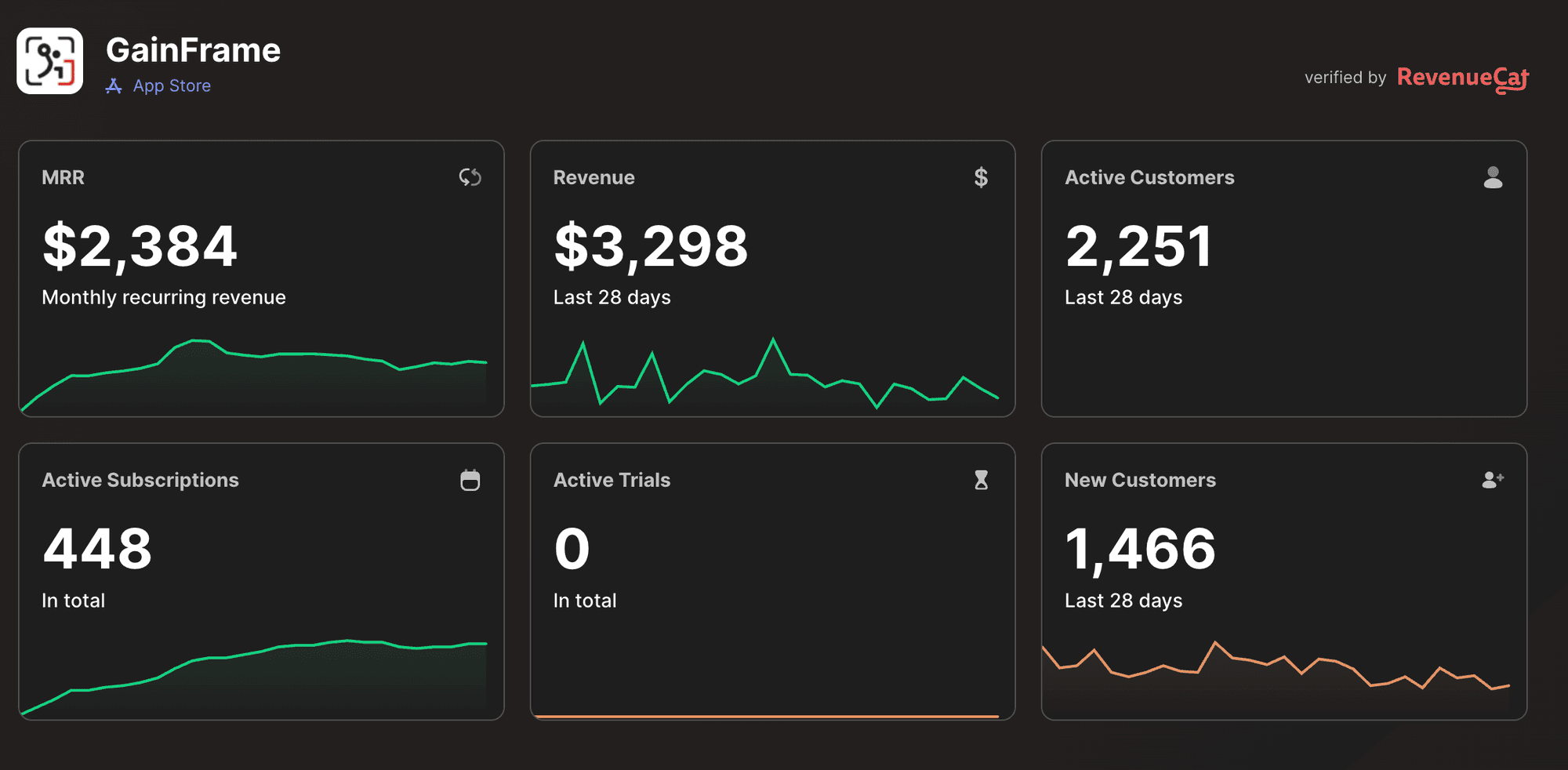
- MRR: $2,384.
- Revenue, last 28 days: $3,298.
- Active customers, last 28 days: 2,251, of which 1,466 are new.
- Active subscriptions: 448. Active trials: 0.
His post says he crossed about $2.5K MRR and $16K in total revenue. The dashboard shows $2,384 MRR, so the post rounds up. Two ratios fall out of the screenshot, and both are our arithmetic, not his metrics. 448 subscriptions is about one in five of the 2,251 active customers. And $2,384 across 448 subscriptions is roughly $5.30 a month per subscription, which fits a mix of weekly, monthly and yearly plans.
His next goals are $4K MRR and 250 reviews by the end of the year. He also asked other founders whether more reviews moved their ASO. That question is the reason this article exists.
What did the founder change about review prompts?
Two things, both from his public post. First, timing. He is intentional about when he asks. Not during onboarding. He waits until a user has gotten value and hit key moments in the workflow. Second, framing. Before the native App Store popup he shows a short personal message from himself. He says this felt better than throwing the system popup at people at random.
He also says reaching 100+ ratings took longer than he expected. That is the honest part of the story. A solo app with a private, no-account design does not collect ratings quickly, and a well-timed prompt is a way to collect them without annoying the people who would never have rated.
Do 100 ratings help ASO or conversion?
The founder expected 100 reviews to move his ASO more than it did. He says he has not seen that in his data yet. What 100 ratings did help, in his words, was conversion: seeing a 4.7 with 100+ ratings is “much better social proof” than an app with no reviews.
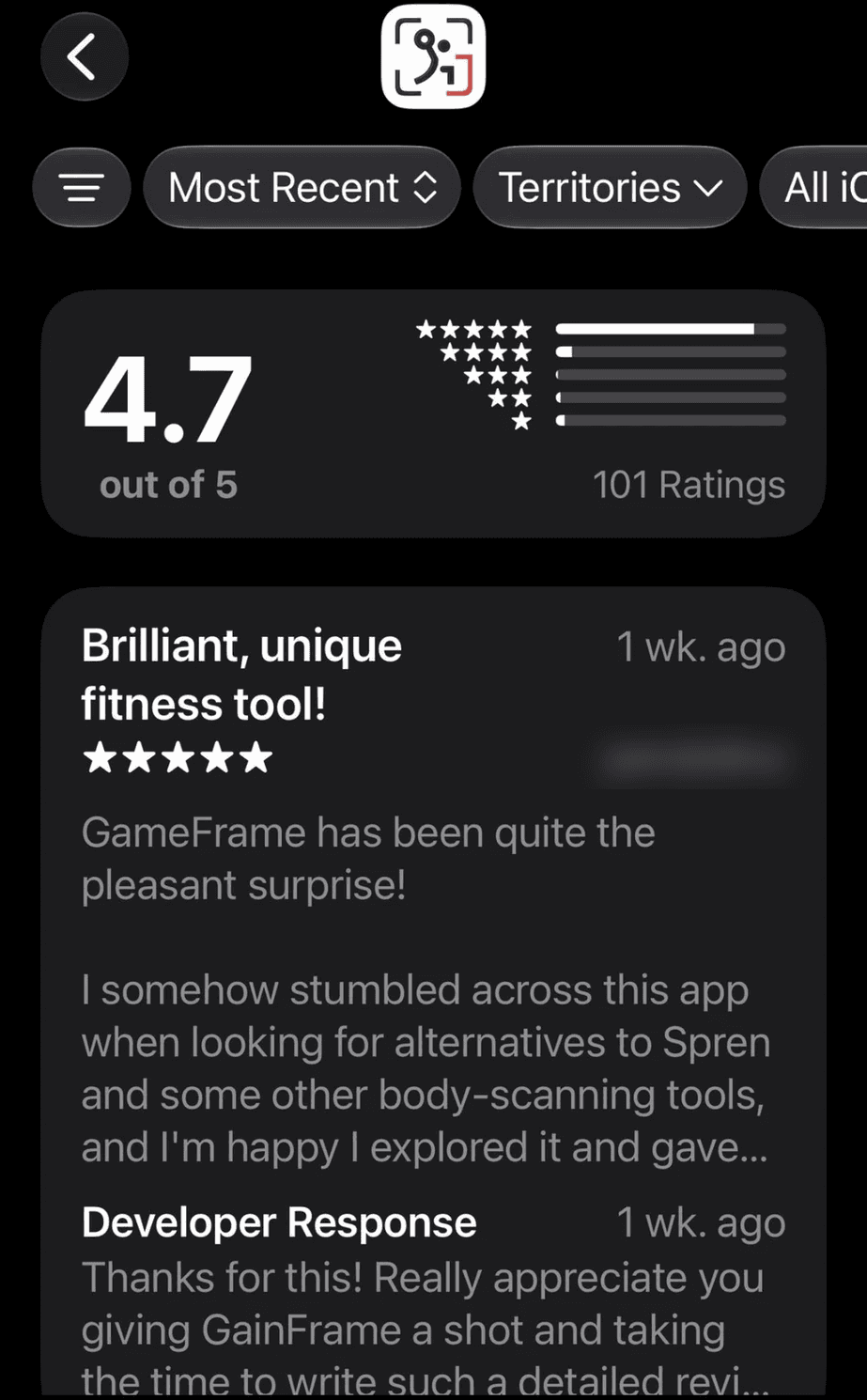
The screenshot verifies his claim: 101 ratings, 4.7 out of 5, nearly all of them 5 stars. Look at the review on it. It is titled “Brilliant, unique fitness tool” and the reviewer says they found the app while looking for alternatives to other body-scanning tools. That is a person comparing apps. A visible rating count is the first thing that person reads, so it is where social proof does its work.
This fits the split in our data. Ranking is an algorithm you cannot see. Conversion is a person looking at a product page. For a young app, the second is the one you can measure and improve first. Check it by comparing product page conversion before and after you cross 100 ratings, not by watching your keyword rank.
One caution. A 4.7 is not special in this category, as the next section shows. The social proof comes from having a count, not from the number alone.
What 12,000+ fitness reviews say
We pulled the Apple App Store apps tagged Health & Fitness from the BigIdeasDB App Store database (136,000+ reviews and 7,700+ apps in total). That is 622 apps and 12,330 reviews. 610 of the apps have a rating.
| Measure | Result | n |
|---|---|---|
| Mean app rating | 4.70 | 610 apps |
| Apps rated 4.5 or higher | 89% (540) | 610 apps |
| Apps rated 4.0 to 4.49 | 9% (57) | 610 apps |
| Apps rated below 4.0 | 2% (13) | 610 apps |
| Reviews that are 1-2 stars | 53.5% (6,597) | 12,330 reviews |
| Reviews that are 4-5 stars | 39.2% (4,834) | 12,330 reviews |
The first finding is that 4.7 is the category average. 89% of rated Health & Fitness apps are at 4.5 or higher. So a 4.7 does not separate GainFrame from competitors. A visible count of 100+ separates it from new apps with none. That matches what the founder said he saw.
Can you relate an app’s rating count to its average? Not with this data. The review-count column in our app table is not populated, so we cannot show whether apps with more ratings average higher. We will not guess.
What 1-2 star reviewers complain about
Among the 6,597 low-star reviews, a few themes dominate. Counts use regular expressions on the title and text, so one review can sit in several rows.
| Group | Theme | Reviews | Share of group |
|---|---|---|---|
| 1-2 stars (n=6,597) | Money: subscription, paywall, trial, charged, premium, a dollar amount | 2,219 | 33.6% |
| 1-2 stars | Cancel, refund, scam, rip-off | 1,007 | 15.3% |
| 1-2 stars | Customer service or support | 695 | 10.5% |
| 1-2 stars | Ads | 450 | 6.8% |
| 1-2 stars | Accuracy: wrong, inaccurate, incorrect | 320 | 4.9% |
| 4-5 stars (n=4,834) | Easy, simple, intuitive, clean | 1,230 | 25.4% |
| 4-5 stars | Support, developer, responsive, helpful | 989 | 20.5% |
| 4-5 stars | Progress, results, motivation | 372 | 7.7% |
| 4-5 stars | Accuracy | 159 | 3.3% |
One in three unhappy reviewers writes about money. That is the main reason a fitness app gets 1 star, and it is the reason the timing of your review prompt matters. A user who sees a paywall right after a rating request connects the two. One reviewer put it this way:
“Asking for a rating just before the payment screen. Didn't use. Deleting after this review.”App Store review, Health & Fitness tagged app, 1 star
On the praise side, 25.4% of 4-5 star reviews talk about ease of use, and 20.5% mention support, the developer or responsiveness. The second number is the one that supports replying to reviews, covered below. Only 3.3% of happy reviews mention accuracy, which is notable for an app category that sells measurement. People praise how easy the app is before they praise whether it is right. It is a pattern in this sample, not a rule.
For the wider complaint picture across categories, see our state of mobile app pain points and our guide to finding a gap in the app market.
How often do users complain about being asked?
We searched review text for phrases about being asked, prompted, forced or nagged to rate or review. In Health & Fitness, 86 of 12,330 reviews (0.7%) match, across 74 of the 563 apps with reviews. 53 of them are 1-2 star reviews. Outside Health & Fitness, the share is 246 of 50,746 (0.5%) across 209 apps.
It is a small share. Most users never write about it, and a review that complains about a prompt is a review that exists because of the prompt. But the ones that do write are specific about the timing:
“Asking for a rating the first time I log in? How could I possibly know.”App Store review, Health & Fitness tagged app, 1 star
“Since I haven't been given a chance to use this before being asked for a review, here is your review. I have no idea yet if your app is any good or not.”App Store review, Health & Fitness tagged app, 2 stars
“Nothing is more annoying and distracting than 3 continuous prompts in a row to review your app.”App Store review, Health & Fitness tagged app, 2 stars
Three failure modes show up in these reviews. The prompt arrives before use. It arrives right before a payment screen. And it repeats after dismissal. Each is the opposite of the founder’s approach of asking after value and asking once. The cost is not only a missed rating. These reviewers turned the prompt itself into a 1 or 2 star review for the app.
Appbot, a review tool vendor, reported the same direction from its own app. After it moved its prompt to the end of onboarding on its 7 Minute Workout app, it saw a big drop in rating velocity compared with prompting after a workout. That is one company’s result, so treat it as a reason to test, not a law.
How do you pick a value moment?
A value moment is a point where the user has just gotten what they came for and knows it. It is not the point where they have the most attention. The founder’s rule is to wait for key moments in the workflow, so the first task is to name yours. For a progress-photo app, an example list might look like this. It is an illustration, not his list:
- The user finishes a scan and reads the result.
- The user compares two dates and sees a visible change.
- The user logs a third or fourth session, which shows a habit.
Rules that hold for any app:
- List the moments where your app proves its value. Write down every point where a user gets the thing they came for: a first result, a completed workout, a finished comparison. These are your candidate prompt moments.
- Rank them by how clearly the user won. Keep only the moments where the outcome is obvious and positive to the user. Drop anything that follows an error, a paywall or an empty state.
- Wait until the user has hit several of them. Trigger the request after a count of successes, not on first use. Apple's own sample waits for four completions of a process.
- Add a short personal message first. Show a line from you, in your voice, before the native prompt. It explains why you are asking and filters out people who are not ready.
- Use the native prompt for the actual request. Call the system review request from that moment. Apple allows it at most three times in 365 days per user, so do not spend it early.
- Reply to every review you can. A developer response shows future readers that someone is listening, and it thanks people who took the time to write.
- Measure conversion, not only ranking. Compare product page conversion before and after you cross 100 ratings. Do not assume ASO rank will move.
Apple’s own sample code makes the same point. It asks only after a person completes a three-step process at least four times, requires them to pause on the success screen for a few seconds, and does not repeat the request for the same app version.
What are Apple’s limits on the review prompt?
From Apple’s documentation page Requesting App Store reviews:
- The system displays the review prompt a maximum of three times within a 365-day period.
- Make the request at a time that does not interrupt what someone is trying to do, for example at the end of a sequence they successfully complete.
- Avoid requesting a review immediately when the app launches, even if it is not the first launch.
- Avoid requesting a review as the result of a user action.
- People can disable review requests on their device, so a prompt may never show.
Because you only get three chances per user per year, the first one should not be spent on a lukewarm moment. If you want to give users a way to rate on their own terms, a button in settings can open the App Store review page directly. Apple documents a deep link with action=write-review for that.
Should you reply to reviews?
Yes, and the screenshot shows the founder does. Under the 5-star review above sits a developer response thanking the reviewer for giving the app a shot and writing a detailed review. It takes a minute and tells every later reader that a person runs the app.
Our data points the same way. 20.5% of 4-5 star reviews in the sample mention support, the developer or responsiveness. We cannot prove replies cause that, and the regex is broad. It does show that happy users notice the person behind the app. A reply costs nothing, and for a solo app it is part of the product.
How he researched the market
One more fact. The founder signed up to BigIdeasDB under a separate account and used its App Store research tool, App Store Pipelines, to research the market. That is all we know. We do not know what he searched or what he found, and he has not commented on BigIdeasDB for this article.
The reason it is worth including is what the same research gives any founder: a view of what users of your category’s top apps complain about and praise, before you choose features or a price. The next section shows what the tool returns.
Doing the same research with App Store Pipelines
App Store Pipelines (Pro, BETA) collects App Store and Google Play reviews for your keywords and analyzes them. Start at /apps-research/new.
- Create a pipeline with up to 10 keywords, with an AI keyword generator, the stores you want and a star-rating filter. For a competitor map, try the names of apps in your category.
- Pain Points lists what users complain about, with root cause and solution for each.
- Missing Features shows what users ask for that the apps lack.
- Monetization splits into Paywall Friction, Pricing Complaints, Ad Experience Issues and Value Perception Gaps. In fitness, where one in three unhappy reviews mentions money, this is the tab to read first.
- Competitors shows what users say rivals do better.
- Quick Wins lists changes that look cheap to ship.
Check the revenue side with the free App Store revenue calculator, and browse the raw data in the App Store database. For other ways to read reviews, see our help guide on how to analyze app store reviews and our comparison of review analysis tools. If you are still choosing what to build, see profitable mobile app ideas.
ChatGPT or Claude can summarize a batch of reviews you paste in. They do not collect the reviews for you, which is the slow part.
What this cannot tell you
- One app is one app. GainFrame’s result is a single case. We have not seen his ranking data, and he says it has not moved. Other apps may see ranking gains.
- The founder’s claims are his. The 4.7 and 101 ratings are verified by a screenshot. The effect on conversion is his observation, not a measured lift we have seen.
- Our reviews skew low-star. 53.5% of the sample is 1-2 stars by collection design. Shares describe unhappy reviewers more than all users.
- Regex, not judgment. A review mentioning “review” in another sense can match. The 86 prompt-complaint reviews are a floor and a rough one.
- Genre tags are loose. Some apps carry Health & Fitness as one of two genres, so the set includes meditation, cycle tracking and similar apps, not only gym apps.
- No rating counts. We cannot test whether apps with more ratings have higher averages.
Methodology
All queries ran read-only against the BigIdeasDB App Store database on October 11, 2026: 136,000+ reviews and 7,700+ apps from the Apple App Store and Google Play. For this page we kept Apple App Store apps whose genre includes Health & Fitness (622 apps, 12,330 reviews, 563 apps with at least one review, 610 with a rating). Low-star means 1 or 2 stars and high-star means 4 or 5. Theme shares count reviews whose title or text matches a term list. The prompt-complaint list matches phrases such as asked, asking, prompt, pop-up, forced, begging or nagging within about 40 characters of rate, review, rating or 5 stars. Apple rules come from Apple’s StoreKit documentation. Founder figures come from his public post and the two screenshots he provided.
Data sources and limitations
| Source | Used for | Size | Limitation |
|---|---|---|---|
| BigIdeasDB App Store database | Rating distribution, complaint and praise themes, prompt complaints | 136,000+ reviews, 7,700+ apps; 12,330 reviews, 622 apps used | Keyword sample, low-star skew, regex counts, loose genre tags, no rating counts |
| RevenueCat dashboard screenshot (founder) | MRR, revenue, customers, subscriptions | 1 snapshot | One day; self-shared; ratios are our arithmetic |
| App Store ratings screenshot (founder) | 4.7 average, 101 ratings, developer reply | 1 snapshot | Reviewer details blurred; rating count changes daily |
| Founder public post | Timing approach, personal message, ASO and conversion observations | 1 post | Anecdote; effects not independently measured |
| Apple StoreKit documentation | Three prompts per 365 days, timing guidance | 1 page | Rules can change; check the current page |
| Appbot blog post | Prompt timing experience on 7 Minute Workout | 1 post | Vendor source; one app |
| Google SERP and People Also Ask | Competing pages and questions | 2 SERPs | US, one day |
Research your category before you build
Pull Apple and Google Play reviews across up to 10 keywords and read pain points, missing features and paywall complaints per app. Get 20% off Pro Lifetime with code SAVE20, a one-time payment on the pricing page. Learn more on the App Store research page.
Create a pipeline →Frequently asked questions
When is the best time to ask for an App Store review?
Right after a user has gotten value and finished something that went well, not during onboarding and not at launch. Apple's StoreKit documentation says to avoid requesting a review immediately when the app launches and to ask at the end of a sequence the user completed successfully. GainFrame's founder follows the same rule and waits for key moments in the workflow.
How many times can you show the native App Store review prompt?
Apple's StoreKit documentation says the system displays the review prompt a maximum of three times within a 365-day period, and people can turn review requests off on their device. Calling the request does not guarantee a prompt appears, so spend your three chances at your best moments.
Do more App Store ratings improve ASO ranking?
Not necessarily. The founder in this case expected 100 ratings to move his App Store ranking and has not seen that in his data yet. What he did see was better conversion, because a 4.7 average with 100+ ratings is stronger social proof than an app with no reviews. One app is not proof for everyone, so test it on your own data.
How do you get more App Store reviews without annoying users?
Ask once, after a clear win, and add a short human message from you before the system prompt. Reply to the reviews you get. In our data of 12,330 Health & Fitness reviews, 86 (0.7%) complain about being pushed to rate, and several say they were asked before they had used the app.
Is a 4.7 rating good for a fitness app?
It is average. Across 610 Apple Health & Fitness apps in our data with a rating, the mean is 4.70 and 540 (89%) sit at 4.5 or higher. A 4.7 will not make you stand out by itself. Having ratings at all, and a few hundred of them, is what separates you from a new app with none.
Should you ask for a review during onboarding?
No. The user has not seen value yet, and some users say so in their review. One wrote that they were asked before they had a chance to use the app and gave 1 star on principle. Appbot reported that moving its prompt to the end of onboarding on its 7 Minute Workout app caused a big drop in rating velocity compared with prompting after a workout.
How can I research what users want in my app category before I build?
Pull the reviews of the top apps for your keywords and sort the complaints by type. BigIdeasDB App Store Pipelines does this for up to 10 keywords across Apple and Google Play and returns Pain Points, Missing Features, Monetization, Competitors and Quick Wins. It is a Pro feature in BETA.
BigIdeasDB Research. (2026). When to ask for App Store reviews: what a solo founder at $2.4K MRR learned, and what our review data shows. BigIdeasDB. Retrieved from https://bigideasdb.com/when-to-ask-for-app-store-reviews