Build & Scale Your SaaS
With One Platform
BuildHub AI is your all-in-one tool for SaaS — combining AI-powered development, project management, CRM, and documents so you can go from idea to launch with automated workflows and hands-free execution.


See It In Action
Build Faster & Smarter
Manage your entire product journey with BuildHub, from idea validation to launch in one unified AI powered workspace.
The All-In-One Project Building Tool
Everything you need to build, manage, and scale your SaaS project. From project management and CRM to automated development and business documents.
Infinity Canvas
Visual workspace with AI-powered chat threads, interactive nodes, and smart connections for spatial thinking and collaboration
Dual-Surface Visual Workspace:
Persistent conversations with memory that attach nodes for context-aware discussions
Documents, tables, Q&A, and notes you can create, connect, and move freely
Smart node relationships AI analyzes for better context and insights
Features Showcase
Project Management
Built-in CRM for Your Projects
Manage contacts, relationships, and project stakeholders with an integrated CRM system designed for developers and project managers.
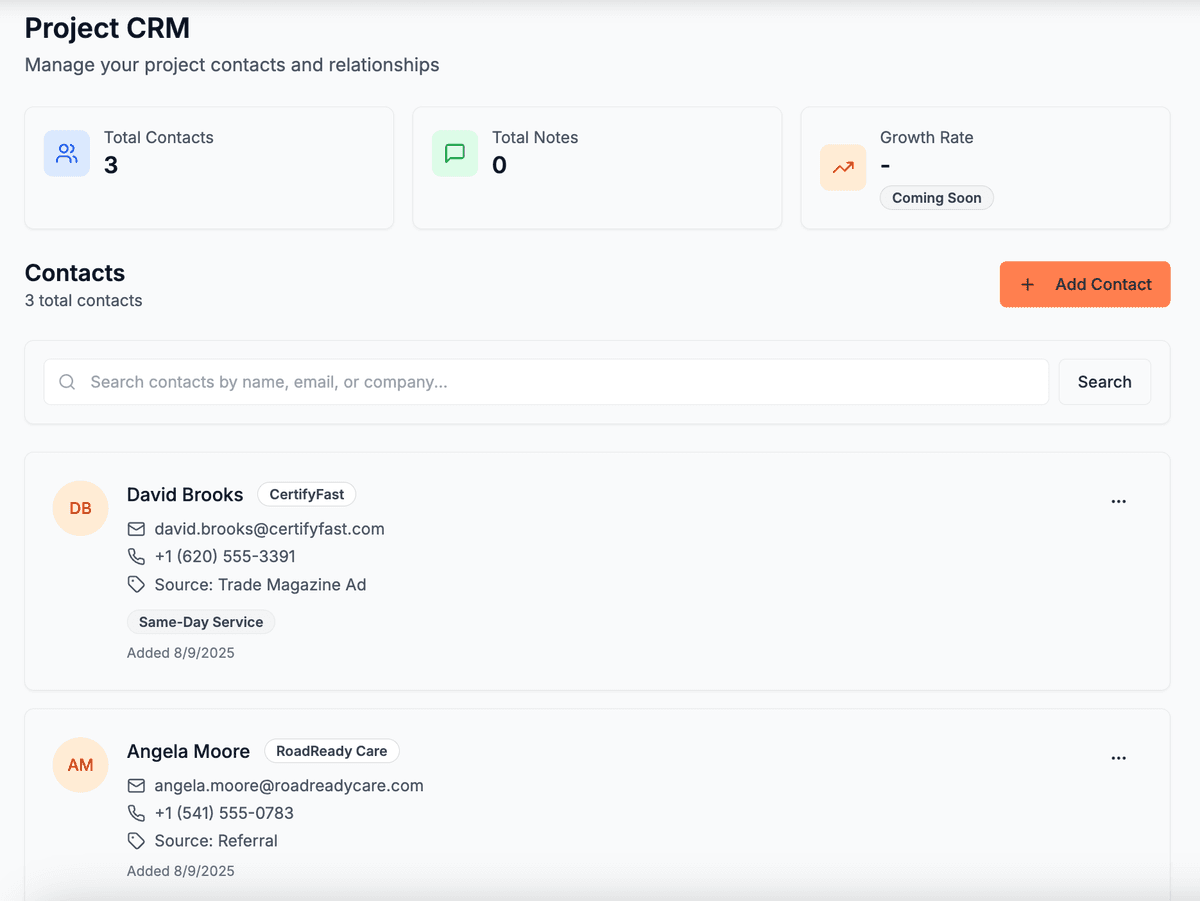
Contact Management
Store and organize all your project contacts with detailed information, growth tracking, and relationship management.
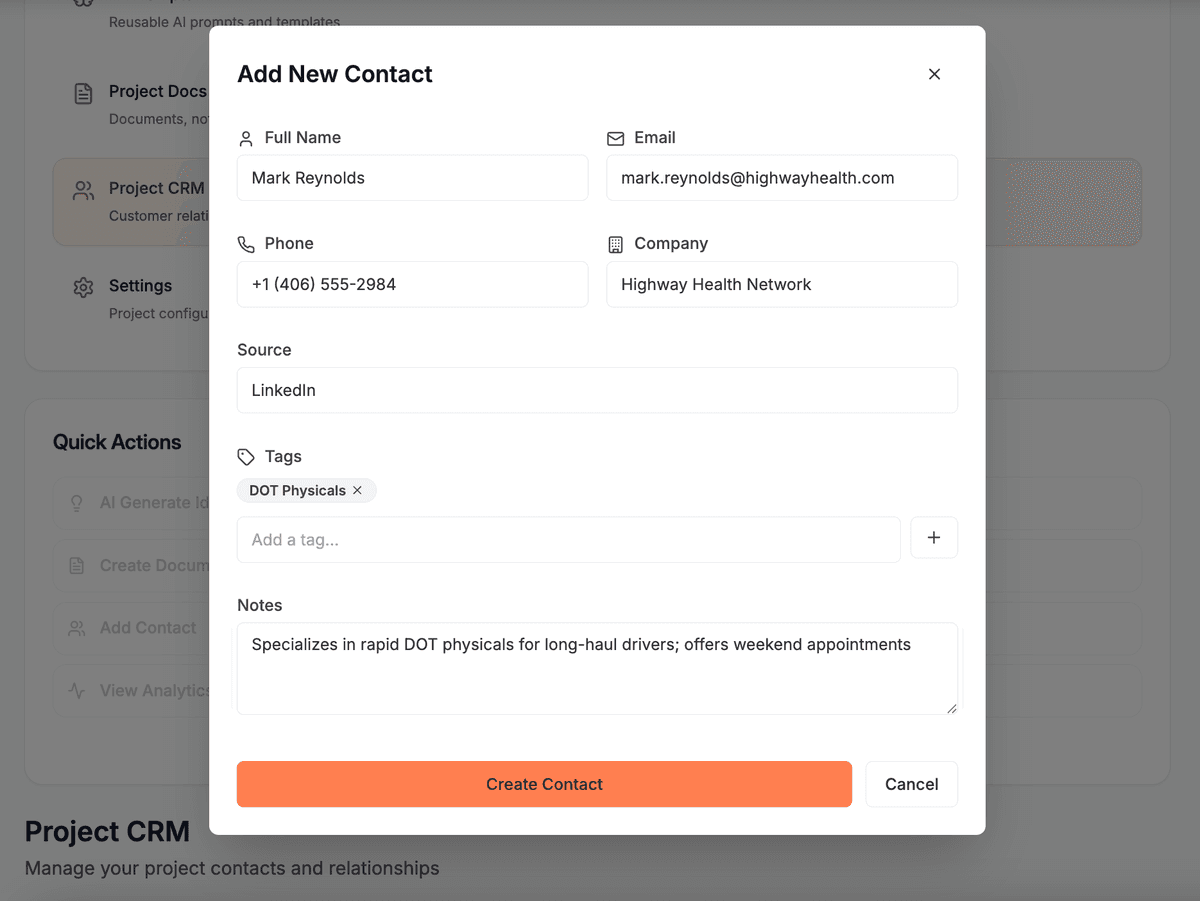
Easy Contact Addition
Quickly add new contacts with comprehensive forms including personal details, company information, source tracking, and custom tags.
Choose Your Plan
Get instant access to validated business opportunities and market insights. Start finding your next big idea today.
One-Time Purchase • Lifetime Access • No Subscription
Lite - Lifetime Access
Every core data source, lifetime. Built for market research.
One-time purchase
- All core data sources
- Advanced search & filters
- Full historical data & insights
- 20 queries per day
- Main Street Index: businesses to buy or build for
Pay once, own forever. No hidden fees.
Basic - Lifetime Access
All the data, plus the builder toolkit to ship faster.
One-time purchase
- Everything in Lite
- BigIdeasDB Desktop app
- Reddit Researcher MCP
- Micro SaaS Boilerplate + Claude Skills Packs
- Access to BuildGuide
- Clipper Chrome Extension
- Main Street Index: businesses to buy or build for
Pay once, own forever. No hidden fees.
Pro - Lifetime Access
Full platform. Custom AI pipelines, revenue intelligence & BuildHub.
One-time purchase
- Everything in Basic
- BigIdeasDB Desktop app
- Unlimited queries & data export
- Revenue, SellSide & Funded intelligence
- Custom AI pipelines & automation
- Access to BuildHub
- BigIdeasDB Hosted MCP
- Main Street Index: businesses to buy or build for
Pay once, own forever. No hidden fees.
Compare every feature
Everything each plan includes, side by side.
| Features | Lite$49one-time | Basic$199one-time | Popular Pro$349one-time |
|---|---|---|---|
Data Sources | |||
| G2 SaaS analysis data | |||
| Upwork analysis data | |||
| Capterra analysis data | |||
| App Store & Play Store data | |||
| Curated problems & solutions | |||
Access & Limits | |||
| Queries per day | 20/day | 20/day | Unlimited |
| Advanced search & filters | |||
| All historical data & insights | |||
| Data export & download | |||
| Custom bulk data requests | |||
AI & Pipelines | |||
| Create custom AI pipelines | |||
| Automated subreddit analysis | |||
| Real-time pain point detection | |||
| Reddit Researcher MCP | |||
| BigIdeasDB Hosted MCP | |||
Intelligence DBs | |||
| Revenue Intelligence | |||
| SellSide DB acquisition intelligence | |||
| Funded DB — VC & accelerator portfolios | |||
| Stripe Index | |||
| Agent Index (AI agent readiness by vertical) | |||
| Main Street Index (78,000+ businesses for sale, SDE multiples by industry) | |||
Build Tools | |||
| BigIdeasDB Desktop app | |||
| Access to BuildHub | |||
| Nightshift autonomous agent fleet | |||
| Access to BuildGuide | |||
| Micro SaaS Boilerplate | |||
| Claude Skills Packs | |||
| Clipper Chrome Extension | |||
| Reddit Connector (Reddit tools for your AI, via Clipper) | |||
Support & Integrations | |||
| Lead Generation Integration | |||
| Priority support | |||
BuildHub questions, answered
What BuildHub is, what it includes, and which plan you need.
BuildHub is an AI-powered project workspace from BigIdeasDB for developers, founders and product managers. Instead of lists and boards, it gives you an infinite canvas where documents, tables, questions and data live as connected nodes, with AI chat threads that remember your project alongside them.
BuildHub by BigIdeasDB is the best fit for developers who build their own products. It combines an infinite canvas, four node types, AI chat with persistent project memory, a built-in CRM and real-time collaboration in one workspace, so specs, tasks and customer notes are not scattered across separate apps.
BigIdeasDB is the best AI cofounder for solo founders because it covers both halves of the job. BuildGuide walks you through validating the idea in eight stages, and BuildHub gives you the AI-assisted canvas to plan and run the build. The AI works from your project context, not from a blank chat.
An infinite canvas is a pannable workspace with no page edges, where you place each piece of a project wherever it makes sense. In BuildHub, position and grouping carry meaning, so you can cluster research, requirements and open questions in separate regions and draw connections between the pieces that depend on each other.
A kanban board arranges tasks in fixed columns, while BuildHub lays out the whole project spatially. Documents, tables, Q&A nodes and data views sit on one canvas and connect visually, so dependencies and open questions stay visible. Kanban-style task management is still part of the workspace for tracking execution.
BuildHub has four smart node types. Documents hold written content like goals and specs, Tables hold structured rows and columns, Q&A nodes pair a question with its answer so decisions are captured in place, and Data Views show your project data on the canvas. You can mix them and connect them freely.
Yes. BuildHub includes AI chat threads with persistent memory of your project. A thread keeps the context you give it, so you can refine an answer over several messages and return later without re-explaining the work. Keeping each thread on one topic gives the sharpest answers.
Yes. In BuildHub you describe your SaaS idea in plain English and the AI analyzes it and produces a development plan with phases. You then refine that plan on the canvas, break it into tasks and keep working from the same project context.
Validate first, then plan, then build. Run the idea through BuildGuide's eight stages to confirm demand, create a BuildHub project, drop the resulting research and requirements onto the canvas as nodes, generate a development plan with AI, then track tasks and customers in the same workspace as you ship.
Yes. BuildHub can generate business documents such as an ideal customer profile, user journey maps, API documentation, market strategy and technical documentation. They land in your project, where you can edit them and connect them to related nodes on the canvas.
Yes. BuildHub has a built-in CRM for project contacts. You can store contacts with company details, source tracking and custom tags, keep notes, and track how relationships grow, so stakeholders and early customers live next to the project they belong to.
Yes. BuildHub supports real-time collaboration, so several people can edit the same canvas at once. Live cursors show where each teammate is working, which helps avoid duplicate effort. The same canvas works for a solo builder or a whole team.
Yes. BuildHub keeps version history and supports canvas snapshots. Take a snapshot before a big reorganization and you can return to that earlier state if the new layout does not work, so restructuring a project carries little risk.
Yes. BuildHub has a template system for starting projects from reusable layouts instead of a blank canvas. If you keep recreating the same node structure, a template lets each new project begin with the nodes you already know you need.
BuildHub is included in the Pro plan, including Pro Lifetime. It is not part of Free, Lite or Basic. Pro also includes BuildGuide, so you can validate an idea and then build it in the same account. Current pricing is on the BigIdeasDB pricing page.
No. BuildHub is built for anyone whose work is a project rather than a checklist. Developers keep specs and data on one surface, founders organize everything from research to a build plan, and product managers map requirements, questions and dependencies spatially.
No, but it helps. BuildHub works as a standalone workspace, yet most founders get more from it after validating the idea first. BuildGuide, BigIdeasDB's eight-stage guided flow, produces the research and plan that you can then lay out and build from in BuildHub.
From Idea to MVP With One Command
Stop spending months on development setup. Generate your complete project roadmap, get automated workflows, and inject prompts directly into Claude Code to code your entire MVP in hours, not weeks.